
JP AJAX Search
Article Index
- JP AJAX Search
- How to install & use
- Basic Module Settings
- Using Language Constants in Text Fields
- Source Status Overview
- Joomla Articles Source
- Product Sources
- Phoca Cart Source
- HikaShop Source
- J2Commerce Source
- DJ-Catalog2 Source
- OCH Subscriptions Source
- Document and File Sources
- jDownloads Source
- DOCman Source
- eDocman Source
- Event Sources
- Event Booking Source
- JEvents Source
- Frontend Style Presets
- Display Settings
- Smart Relevance Ranking
- Access Levels and Visibility
- Frontend Testing
- Troubleshooting
- Developer Notes
- Recommended Setup
- All Pages
JP Ajax Search is a lightweight AJAX search module for Joomla. It can search Joomla Articles, products, documents, files, and events from supported Joomla extensions, and display the results in a fast AJAX dropdown.
The module is designed for modern Joomla websites and can be used with UIkit / YOOtheme, Bootstrap 5, or its own Generic JP Ajax Search CSS preset. It is especially useful for header search, navbar search, webshop product search, catalog search, software product search, document search, event search, and mixed-source search where results from several Joomla extensions should appear in one clean dropdown.
How to install & use:
- Download the latest version of the JP Ajax Search module from the product page.
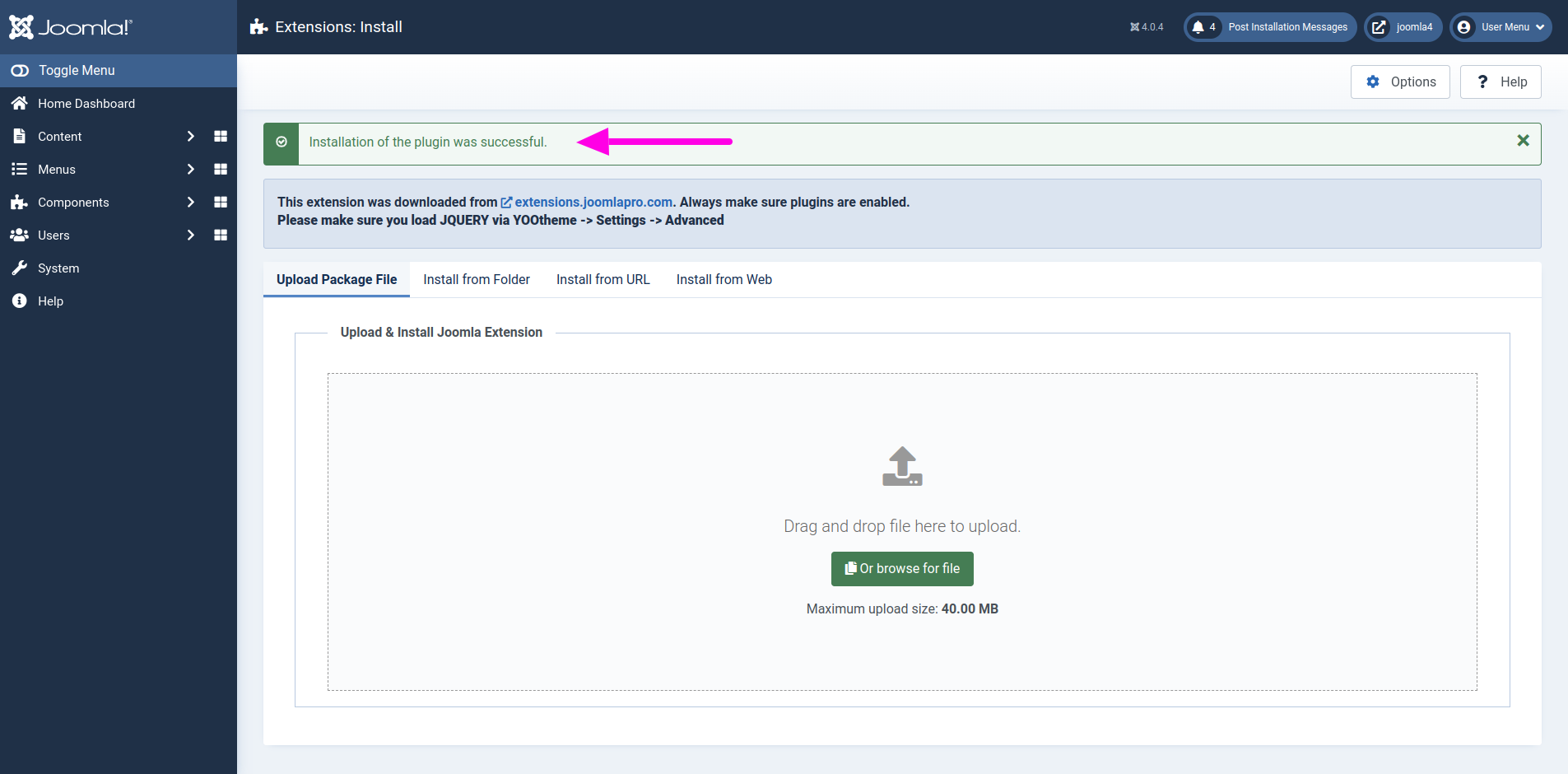
- Install the module using Joomla Extension Manager.
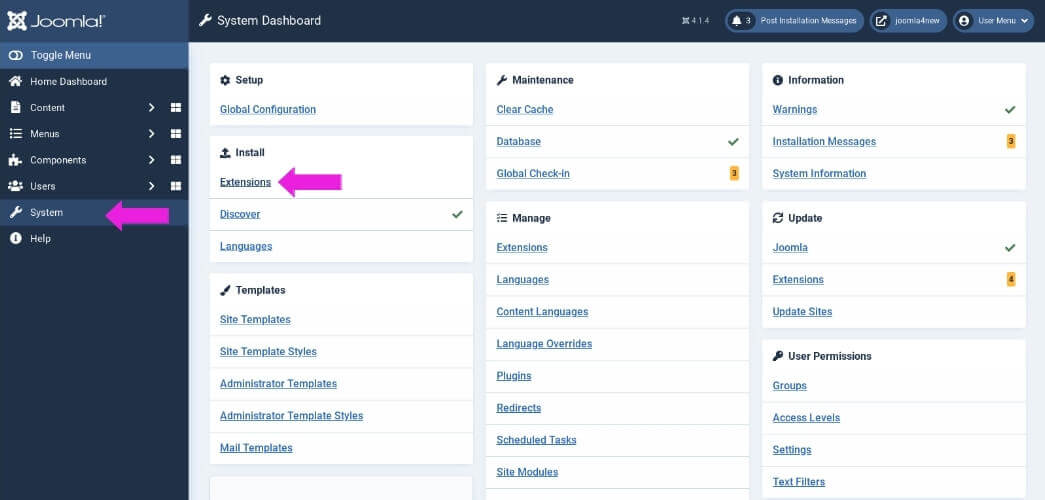
- In Joomla admin, go to System -> Extensions.
- Upload the JP Ajax Search ZIP package and install it.
- After installation, go to Content -> Site Modules or System -> Manage -> Site Modules, depending on your Joomla version and admin workflow.
- Find the module named JP Ajax Search.
- Open the module and publish it.
- Select a suitable module position, for example a navbar, header, search, or custom module position.
- Assign the module to the menu pages where it should appear.
Basic Module Settings
The main Module tab contains the basic frontend text and search behavior settings.
- Placeholder text - Text shown inside the search input before the user starts typing.
- Loading text - Text shown while AJAX results are loading.
- Empty text - Text shown when no results are found.
- Error text - Text shown if the AJAX request fails.
- Search input aria label - Accessibility label for the search input.
- Search button aria label - Accessibility label for the search button/icon.
- Minimum characters - The search starts only after the user has typed this many characters.
- Result limit - Number of results returned in the first result batch. This is also used as the Load more batch size.
For most websites, a minimum character value of 2 and a result limit of 6 is a good starting point.
Using Language Constants in Text Fields
Frontend text fields can use either normal custom text or Joomla language constants.
For example, the Load more text field can contain normal text:
Load moreOr it can contain a language constant:
MOD_JP_AJAX_SEARCH_DEFAULT_LOAD_MORE_TEXTIf a language constant is used, Joomla will translate the text using the active site language.
- This is useful for multilingual websites.
- Custom literal text is still supported.
- Language constants are resolved on the frontend before the text is passed to JavaScript.
Source Status Overview
The Sources tab contains a Source Status Overview. This section shows which supported components are installed, enabled, disabled, or not available on the current Joomla website.
Only sources that are both implemented and enabled are searched.
The status overview can show information such as:
- Built-in / Enabled - The source is built into Joomla or the module and is active.
- Available / Enabled - The supported extension is installed and the source is enabled in the module.
- Available / Disabled - The supported extension is installed, but the source is disabled in the module.
- Not installed / Coming later - The extension is not installed or the source is not currently searchable.
This makes it easier to see which sources can be used on the current site.
Joomla Articles Source
The Joomla Articles source searches normal Joomla content articles.
- Enable Joomla Articles - Enables or disables article results completely.
- Joomla Articles priority - Sets the source priority from 1 to 9.
- Search in title - Allows matches in the article title.
- Search in intro text - Allows matches in the article intro text.
- Search in full text - Allows matches in the article full text.
- Search in alias - Allows matches in the article alias.
- Include categories - Restricts article search to selected categories.
- Include child categories - Includes child categories when parent categories are selected.
The Joomla Articles source respects normal Joomla article visibility rules, including published state, category state, access level, language, publish up date, and publish down date.
Article images are handled in this order:
- Intro image
- Full article image
- Configured missing image behavior
Article URLs are generated using Joomla routing. When a matching menu item exists, JP Ajax Search tries to use the proper Joomla SEF URL.
Product Sources
JP Ajax Search includes product and catalog search support for several Joomla e-commerce and catalog extensions.
Supported product sources include:
- Phoca Cart
- HikaShop
- J2Commerce
- DJ-Catalog2
- OCH Subscriptions
Each product source can be enabled or disabled separately from the Sources tab.
Depending on the extension, product and catalog results can include:
- Product title
- Product category
- Manufacturer / producer
- Price
- Old price / sale price where available
- Subscription period where available
- Product key where available
- Product image
- SKU / product code
- EAN where supported
- Product teaser or short description where supported
- Description search where enabled
- Product URL generated through the product component where possible
Product sources are useful for webshop header search, catalog search, software product search, subscription product search, product directory search, and quick product lookup.
Phoca Cart Source
The Phoca Cart source searches Phoca Cart products.
- Enable Phoca Cart products - Enables or disables Phoca Cart results.
- Phoca Cart priority - Sets the source priority from 1 to 9.
- Search product title - Search product titles.
- Search product SKU - Search product SKU values.
- Search product EAN - Search product EAN values.
- Search product description - Search product descriptions.
- Show product price - Display product prices in the dropdown.
- Show product manufacturer - Display product manufacturer information.
- Show product category - Display product category information.
If all Phoca Cart search fields are disabled, title search is used as a fallback.
HikaShop Source
The HikaShop source searches HikaShop products.
- Enable HikaShop products - Enables or disables HikaShop results.
- HikaShop priority - Sets the source priority from 1 to 9.
- Search product title - Search product names.
- Search product code - Search product codes.
- Search product description - Search product descriptions.
- Show product price - Display product prices.
- Show product manufacturer - Display product manufacturer information where available.
- Show product category - Display product category information.
If all HikaShop search fields are disabled, title search is used as a fallback.
J2Commerce Source
The J2Commerce source searches J2Commerce products and their linked Joomla articles.
- Enable J2Commerce products - Enables or disables J2Commerce results.
- J2Commerce priority - Sets the source priority from 1 to 9.
- Search product title - Search linked article/product titles.
- Search product SKU - Search SKU or product code values.
- Search product description - Search product/article description where available.
- Show product price - Display product price.
- Show product manufacturer - Display manufacturer information where available.
- Show product category - Display category information.
JP Ajax Search includes duplicate suppression so that a J2Commerce product and its linked Joomla article do not normally appear as duplicate results.
DJ-Catalog2 Source
The DJ-Catalog2 source searches products from the DJ-Catalog2 component. This is useful for catalog websites, product directories, manufacturer catalogs, wine catalogs, portfolio-style product listings, and Joomla websites that use DJ-Catalog2 as their main catalog or product system.
- Enable DJ-Catalog2 products - Enables or disables DJ-Catalog2 product results.
- DJ-Catalog2 priority - Sets the source priority from 1 to 9.
- Search product title - Search DJ-Catalog2 product names.
- Search product SKU - Search product SKU values.
- Search product description - Search product descriptions when enabled.
- Search product manufacturer - Search the linked DJ-Catalog2 manufacturer / producer name.
- Show product SKU - Display the product SKU in the result meta line.
- Show product manufacturer - Display the linked manufacturer / producer in the result meta line.
- Show product category - Display the DJ-Catalog2 category in the result meta line.
- Show product description - Display a short product description in the dropdown.
- Description source - Choose whether the result description should use the intro description, full description, or both.
- DJ-Catalog2 debug - Enables temporary debug logging for troubleshooting DJ-Catalog2 search queries. This should normally be disabled on production websites.
DJ-Catalog2 product results can include the product name, SKU, manufacturer / producer, category, description, product image, and product URL.
Product images are loaded from the DJ-Catalog2 media image path where available. If no product image is found, JP Ajax Search uses the configured missing image behavior from the Display tab.
The DJ-Catalog2 source respects product published state, category published state, access levels, language visibility, and publish up / publish down dates where those fields are available in the DJ-Catalog2 database tables.
If all DJ-Catalog2 search fields are disabled, product title search is used as a fallback.
For catalog websites with portrait-style product images, such as wine bottles, use the Display tab thumbnail settings to improve how product images appear in the dropdown.
OCH Subscriptions Source
The OCH Subscriptions source searches products from the OCH Subscriptions component. This is useful for websites that sell digital products, software products, subscription plans, licenses, memberships, and downloadable products.
- Enable OCH Subscriptions products - Enables or disables OCH Subscriptions results.
- OCH Subscriptions priority - Sets the source priority from 1 to 9.
- Search product title - Search product names or titles.
- Search product alias - Search product aliases.
- Search product key - Search product keys.
- Search product teaser - Search product teaser text where available.
- Search short description - Search short description text where available.
- Show product price - Display product price.
- Show subscription period - Display subscription period where available.
- Show product key - Display product key where available.
- Description source - Choose whether to use no description, product teaser, or short description in the result.
Prices are formatted using OCH Subscriptions configuration where possible, including currency symbol, currency position, and price format.
If all OCH Subscriptions search fields are disabled, title search is used as a fallback.
Document and File Sources
JP Ajax Search can search document and file components. This is useful for documentation websites, public-sector websites, intranets, download archives, and knowledge bases.
Supported document and file sources include:
- jDownloads
- DOCman
- eDocman
Document and file results can include:
- Document or file title
- Category
- File type
- File size
- Version
- Download date
- Document image, icon, or fallback image
- Document page URL or download URL where safely supported
The module avoids exposing filesystem paths and uses safe public URLs or component routes where possible.
jDownloads Source
The jDownloads source searches downloadable files from jDownloads.
- Enable jDownloads files - Enables or disables jDownloads results.
- jDownloads priority - Sets the source priority from 1 to 9.
- Search file title - Search download titles.
- Search file description - Search file descriptions where supported.
- Search file name - Search actual file names.
- Show file category - Display category information.
- Show file type - Display file type, such as PDF or ZIP.
- Show file size - Display file size.
- Show version - Display file version where available.
DOCman Source
The DOCman source searches documents from DOCman.
- Enable DOCman documents - Enables or disables DOCman results.
- DOCman priority - Sets the source priority from 1 to 9.
- DOCman result link target - Choose whether results link to the document page or direct download where safely supported.
- Search document title - Search DOCman document titles.
- Search document alias - Search document aliases.
- Search document description - Search document descriptions where supported.
- Search file name - Search file names.
- Show document category - Display document category.
- Show file type - Display file type.
- Show file size - Display file size.
- Show version - Display document version where available.
For most websites, Document page is the recommended result link target because it is safer, more SEO-friendly, and works better with protected document routes.
eDocman Source
The eDocman source searches documents from eDocman.
- Enable eDocman documents - Enables or disables eDocman results.
- eDocman priority - Sets the source priority from 1 to 9.
- Search document title - Search eDocman document titles.
- Search document alias - Search document aliases.
- Search document description - Search descriptions where supported.
- Search file name - Search file names.
- Show document category - Display document category.
- Show file type - Display file type.
- Show file size - Display file size.
- Show version - Display document version where available.
Event Sources
JP Ajax Search can search event components and display event results together with articles, products, documents, and files.
Supported event sources include:
- Event Booking
- JEvents
Event results can include:
- Event title
- Event category
- Event date
- End date where available
- Location
- Event image
- Event detail URL
Event Booking Source
The Event Booking source searches events from the Event Booking component.
- Enable Event Booking events - Enables or disables Event Booking results.
- Event Booking priority - Sets the source priority from 1 to 9.
- Search event title - Search event titles.
- Search event description - Search event descriptions.
- Search event location - Search event location fields.
- Show event category - Display event category.
- Show event date - Display event date.
- Show event location - Display event location.
JEvents Source
The JEvents source searches events from the JEvents component.
- Enable JEvents events - Enables or disables JEvents results.
- JEvents priority - Sets the source priority from 1 to 9.
- Search event title - Search event titles.
- Search event description - Search event descriptions where supported.
- Search event location - Search event location fields where supported.
- Show event category - Display event category.
- Show event date - Display event date.
- Show event location - Display event location.
Recurring events are handled carefully so the dropdown does not fill with repeated instances of the same event.
Frontend Style Presets
JP Ajax Search includes frontend style presets. These presets control which frontend framework classes are added to the search form. The JP Ajax Search base classes are always included.
- UIkit / YOOtheme - Recommended for YOOtheme Pro and UIkit-based websites. This is the default preset for backward compatibility.
- Bootstrap 5 - Adds Bootstrap-friendly classes such as
form-control,btn, andbtn-outline-secondary. It does not require Bootstrap JavaScript. - Generic / JP Ajax Search CSS - Adds no UIkit or Bootstrap classes. The module uses only its own bundled CSS and stable JP Ajax Search classes.
This makes the module suitable for YOOtheme Pro websites, Bootstrap-based Joomla templates, and custom Joomla templates.
Display Settings
The Display tab controls how the search field and dropdown look on the frontend.
Frontend Style Preset
- Frontend style preset - Choose whether the module should use UIkit / YOOtheme, Bootstrap 5, or Generic JP Ajax Search CSS classes.
The selected preset affects the search field classes, but the AJAX dropdown and result rendering continue to use the stable JP Ajax Search base classes.
Search Field Layout
- UIkit search style - Select the UIkit-style search appearance. This is only used with the UIkit / YOOtheme preset.
- Use UIkit input class - Adds UIkit input styling to the search field. This is only used with the UIkit / YOOtheme preset.
- Search width - Controls the search input width.
Dropdown Layout
- Dropdown width - Controls the result dropdown width.
- Dropdown max height - Controls the maximum height before internal scrolling is used.
- Dropdown alignment - Align the dropdown left, right, or based on the module layout.
- Thumbnail size - Controls the thumbnail size in result rows.
- Thumbnail image fit - Controls how result images fit inside the thumbnail area. Use Cover for normal cropped thumbnails or Contain when the full image should remain visible.
- Thumbnail image zoom - Scales the image inside the thumbnail area. This is useful for portrait-style product images such as bottles, tall packaging images, or narrow catalog images.
For normal article and product images, the default thumbnail behavior is usually best. For portrait-style product images, such as wine bottles in DJ-Catalog2, a good starting point is:
- Thumbnail size: 56
- Thumbnail image fit: Contain
- Thumbnail image zoom: 130%
Load More
- Enable Load more - Allows users to load more results inside the dropdown.
- Load more text - Text used for the Load more button.
- Maximum dropdown results - Maximum number of results that can be loaded into the dropdown.
The Result limit from the Module tab controls how many results are loaded per batch.
Missing Images
- Missing image behavior - Choose what happens when a result has no image.
- Fallback image - Select an image to use when a result has no image.
Available missing image behavior can include using a fallback image, showing a placeholder, or hiding the image area.
Result Type Labels
- Show result type label - Shows labels such as Article, Product, Document, Event, or Download in the result meta line.
Result type labels are translatable. For example, on a Swedish site Article can be displayed as Artikel.
Themes, Colors and Custom Classes
- Dropdown colors can help avoid white-on-white or dark-on-dark result panels.
- Custom classes can be added for site-specific styling.
- JP Ajax Search base classes are always included, regardless of frontend preset.
Smart Relevance Ranking
JP Ajax Search includes two ranking modes.
Simple / Source Order
Simple mode keeps results close to source priority and provider order. It is the safest and most predictable mode.
Smart Relevance
Smart relevance ranks mixed results by match quality. Strong title, SKU, file name, product key, category, manufacturer, location, and description matches can outrank higher-priority sources. Source priority is still used, but only as a small boost.
The scoring model works like this:
final_score = match score + (source priority * 3)Example:
score 85 + priority 6 * 3 = final_score 103This means a strong match from a lower-priority source can still appear above a weak match from a higher-priority source.
Ranking Debug
Ranking debug adds scoring information to AJAX JSON responses for testing.
Debug fields can include:
scorefinal_scorescore_debugpriority
Ranking debug should normally be disabled on production websites.
Access Levels and Visibility
JP Ajax Search is designed to respect Joomla access rules where supported by each provider.
Depending on the source, the module checks:
- Published state
- Category published state
- Joomla access levels
- Current user authorised view levels
- Language visibility
- Publish up and publish down dates
- Provider-specific visibility fields
This means restricted content should not appear for guests if the source provides the required access information.
If a result appears or disappears depending on login state, check the access settings in Joomla and in the related component.
Frontend Testing
After configuring the module, test the search field on the frontend.
- Search for a normal Joomla article.
- Search for a product if product sources are enabled.
- Search for a DJ-Catalog2 product, SKU, manufacturer, or category if DJ-Catalog2 is enabled.
- Search for a document or file if document sources are enabled.
- Search for an event if event sources are enabled.
- Test no-result text using a search query that should not return anything.
- Test Load more if enabled.
- Test each frontend style preset if the website uses different frontend frameworks.
- Test thumbnail fit and zoom settings if product images have mixed aspect ratios.
- Test on desktop and mobile.
- Test as guest and logged-in user when access levels are important.
When testing mobile layouts, test on a real mobile device if possible. Browser resize mode can behave differently from actual mobile browsers.
Troubleshooting
No Results Are Shown
- Check that the module is published.
- Check that the module is assigned to the current menu item.
- Check the minimum characters setting.
- Check that at least one source is enabled.
- Check that the related component is installed and enabled.
- Check source-specific search fields.
- Check Joomla access levels and publishing state.
DJ-Catalog2 Products Are Not Found
- Check that the DJ-Catalog2 component is installed and enabled.
- Check that the DJ-Catalog2 source is enabled in JP Ajax Search.
- Check that at least one DJ-Catalog2 search field is enabled, such as product title, SKU, manufacturer, or description.
- Check that the DJ-Catalog2 products are published.
- Check product category state, access level, language, publish up date, and publish down date.
- Enable DJ-Catalog2 debug temporarily if you need to troubleshoot the generated source query.
- Disable DJ-Catalog2 debug again after testing.
Load More Does Not Appear
- Check that Load more is enabled in the Display tab.
- Check that more results exist than the current Result limit.
- Check Maximum dropdown results.
Wrong or Missing Images
- Check whether the result actually has an image in the source component.
- For Joomla Articles, check the Intro Image and Full Article Image fields.
- Check the Missing image behavior setting.
- Check the fallback image setting.
DJ-Catalog2 Results Are Missing Images
- Check that the DJ-Catalog2 product has an image assigned in the DJ-Catalog2 product manager.
- Check that the image file exists under the DJ-Catalog2 media image path.
- Check the Missing image behavior setting in JP Ajax Search.
- For tall product images, adjust Thumbnail image fit and Thumbnail image zoom in the Display tab.
Product Thumbnails Look Too Small or Too Cropped
- Use Thumbnail image fit: Cover for normal photo-style thumbnails.
- Use Thumbnail image fit: Contain when the full product image should remain visible.
- Increase Thumbnail image zoom for tall or narrow product images.
- Increase Thumbnail size if the result row has enough space.
Non-SEF Article URLs
- JP Ajax Search uses Joomla routing for article URLs.
- If an article has a direct menu item, Joomla should normally generate the proper SEF URL.
- If no suitable menu item exists, Joomla may generate a fallback URL.
- Check your Joomla menu structure if an article URL does not look as expected.
Invalid AJAX JSON
If AJAX responses become invalid JSON, check whether another extension is printing PHP warnings, notices, or deprecated messages before the JSON response.
JP Ajax Search isolates provider errors where possible, but output emitted earlier by another extension can still break JSON responses.
Smart Relevance Looks Unexpected
- Enable Ranking debug temporarily.
- Check the returned
score,final_score, andscore_debugfields. - Remember that source priority is only a small boost in Smart relevance mode.
- Disable Ranking debug again after testing.
Frontend Style Looks Wrong
- Check the Frontend style preset in the Display tab.
- Use UIkit / YOOtheme for YOOtheme Pro and UIkit-based websites.
- Use Bootstrap 5 for Bootstrap-based Joomla templates.
- Use Generic / JP Ajax Search CSS for custom templates or lightweight builds.
- Check custom CSS classes and dropdown color settings if the layout needs site-specific styling.
Developer Notes
JP Ajax Search uses a provider-based architecture. Each supported source returns a normalized result object so the frontend can render mixed results consistently.
Common result fields include:
sourcesource_grouptypetype_labelidtitleurlimagecategorymanufacturerpricefile_typefile_sizeversionevent_datelocationpriority
Internal scoring fields are hidden from normal JSON output unless Ranking debug is enabled.
DJ-Catalog2 support uses the DJ-Catalog2 product table, category table, producer / manufacturer table, and media image table where available. The provider is defensive and should avoid fatal errors if DJ-Catalog2 is not installed or if optional columns are missing.
Recommended Setup
For a normal header search, these settings are a good starting point:
- Minimum characters: 2
- Result limit: 6
- Enable Load more: Yes
- Maximum dropdown results: 24
- Dropdown max height: 420px
- Frontend style preset: UIkit / YOOtheme for YOOtheme sites, Bootstrap 5 for Bootstrap templates, or Generic for custom templates
- Ranking mode: Smart relevance for mixed sources, Simple / source order for predictable source-based ordering
- Ranking debug: No
For webshop search, enable product sources and consider giving product sources a higher priority.
For catalog websites, enable DJ-Catalog2 and test product title, SKU, manufacturer, category, image, and URL output carefully.
For wine catalogs, product directories, and other catalogs with tall product images, try Thumbnail image fit: Contain and Thumbnail image zoom: 130%.
For software product and subscription search, enable OCH Subscriptions and test product title, product key, price, and description output.
For document-heavy websites, enable DOCman, eDocman, or jDownloads and test access levels carefully.
For multilingual websites, use Joomla language constants in configurable frontend text fields.
