
Translation variables
- pistenclub
- Offline Topic Author
- User
-

- Posts: 11
- Thank you received: 0
Hi, I use the events booking translation functionality for different things (e.g. custom fields in events):
docs.joomdonation.com/eventsbooking/basic-setup/translation
Unfortunately in my custom built layouts I only see the keys of the variables instead of the translated value. Is there a way to change this so I can use translations in my layouts?
Unfortunately in my custom built layouts I only see the keys of the variables instead of the translated value. Is there a way to change this so I can use translations in my layouts?
by pistenclub
Please Log in or Create an account to join the conversation.
- JProStudio
-
 Offline
- Admin
-

- Posts: 536
- Thank you received: 80
We apologize for not understanding your query properly. To help us serve you better, could you please explain the specific problem you are facing in detail or send us a screenshot(or video link) with site admin credentials. Please follow our support portal in future queries “https://extensions.joomlapro.com/support/tickets” for instant solution. Thank you,
For urgent help please create a support ticket extensions.joomlapro.com/support/tickets
by JProStudio
Please Log in or Create an account to join the conversation.
- pistenclub
- Offline Topic Author
- User
-
- Posts: 11
- Thank you received: 0
Hi, finally I found some time to get back to this topic.
If I use the default Event Booking list of events instead of your component, the button to register for an event is labelled as "Register (Individual)". If I want to change the text of this button, I can use the translation option of event booking.
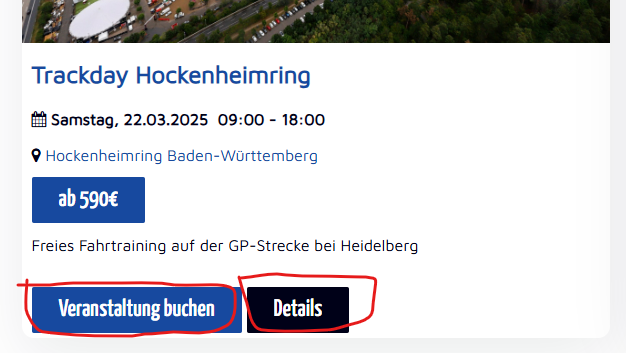

Now I have built my event overview using JP CE Grid Pro and added the register-link to the grid. I also have to set the link text that should be shown on the button. The problem is that I run this website in multiple languages. So if i set the link text to "Veranstaltung buchen", it will be shown in all languages. So I tried setting the link text to the translation variable "EB_REGISTER" instead but it doesn't work.
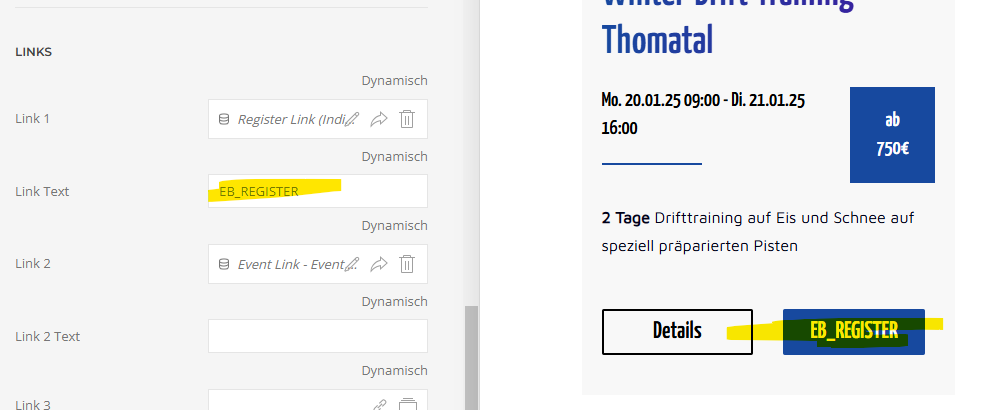
Is there a way to get the proper text from the translation variable? As you can see in the screenshot, the translation works properly for the "event message" item.
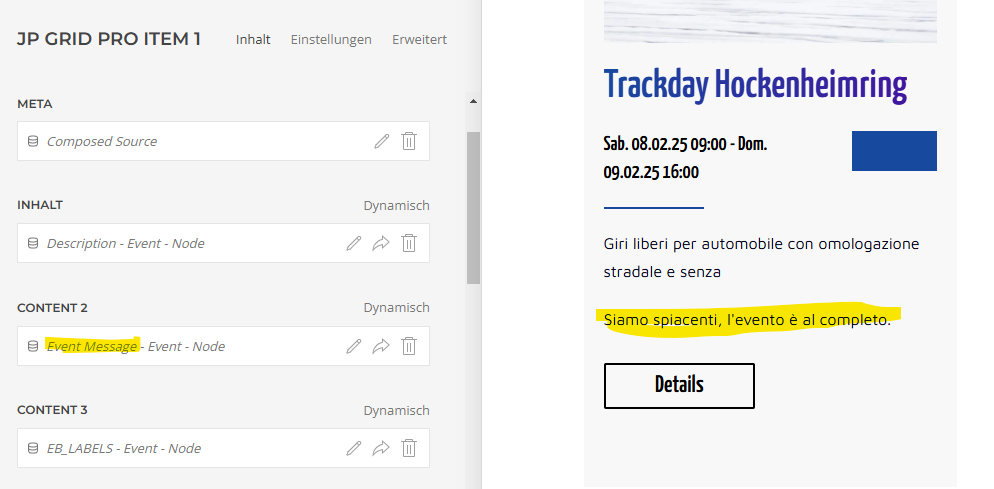
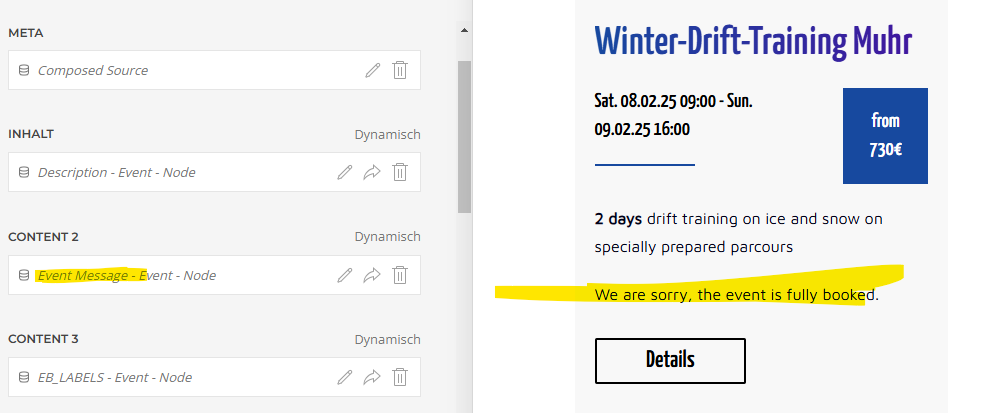
If I use the default Event Booking list of events instead of your component, the button to register for an event is labelled as "Register (Individual)". If I want to change the text of this button, I can use the translation option of event booking.
Now I have built my event overview using JP CE Grid Pro and added the register-link to the grid. I also have to set the link text that should be shown on the button. The problem is that I run this website in multiple languages. So if i set the link text to "Veranstaltung buchen", it will be shown in all languages. So I tried setting the link text to the translation variable "EB_REGISTER" instead but it doesn't work.
Is there a way to get the proper text from the translation variable? As you can see in the screenshot, the translation works properly for the "event message" item.
by pistenclub
Please Log in or Create an account to join the conversation.
- JProStudio
-
Offline
- Admin
-
- Posts: 536
- Thank you received: 80
We have started working on a fix for this issue in JP CE Grid Pro element and will commit it along with other updates. We will release the upcoming version as soon as possible. Thank you
For urgent help please create a support ticket extensions.joomlapro.com/support/tickets
by JProStudio
Please Log in or Create an account to join the conversation.
- pistenclub
- Offline Topic Author
- User
-
- Posts: 11
- Thank you received: 0
Hi, I found a related issue to this. I have built a layout template for the event detail page as you can see here:
www.pistenclub.de/en/events/it/250731mug
The button just on top which says "Buchen" is a link to the individual registration. I have the same problem here as in the grid. If I leave the link label empty, the button doesn't show up. If I write EB_REGISTER, it won't be shown properly. So the best would be if the link to the individual registration would just show the default value as in the grid.
Also if you scroll down you can see a description of the location. It is also not translated. The description of a location can be translated directly in the event booking component.
The button just on top which says "Buchen" is a link to the individual registration. I have the same problem here as in the grid. If I leave the link label empty, the button doesn't show up. If I write EB_REGISTER, it won't be shown properly. So the best would be if the link to the individual registration would just show the default value as in the grid.
Also if you scroll down you can see a description of the location. It is also not translated. The description of a location can be translated directly in the event booking component.
by pistenclub
Please Log in or Create an account to join the conversation.
- JProStudio
-
Offline
- Admin
-
- Posts: 536
- Thank you received: 80
Please explain the problem you are facing in detail with screenshots (or video link) . Please follow our support portal here “
extensions.joomlapro.com/support/tickets
” with site admin credentials, so that we can check and give you a best solution. Thank you
For urgent help please create a support ticket extensions.joomlapro.com/support/tickets
by JProStudio
Please Log in or Create an account to join the conversation.
Time to create page: 0.322 seconds
