
Product SKU field returns formatted output instead of plain text

Product SKU field returns formatted output instead of plain text was created by keep2000
Posted 11 months 4 weeks ago #981
Hi guys,
I noticed that the Product SKU field adds extra markup around the value when retrieved — for example, it wraps it in a <div class="ph-sku"> and even includes a <style> tag like:
It’s a small thing, but in a grid view this style block can repeat many times, and more importantly, it prevents me from using the SKU for matching.
I’m trying to use YOOtheme Essentials’ database source to fetch records from an external table where the SKU matches, but since the table stores it as plain text and PCuikit returns it formatted, the “equal to” comparison doesn’t work.
Would it be possible to either add a separate “plain SKU” field, or maybe add a parameter to the existing field so we can choose whether to return the formatted or raw value?
Thanks!
I noticed that the Product SKU field adds extra markup around the value when retrieved — for example, it wraps it in a <div class="ph-sku"> and even includes a <style> tag like:
Code:
<style>
.ph-sku-txt {display: none;}
</style>
It’s a small thing, but in a grid view this style block can repeat many times, and more importantly, it prevents me from using the SKU for matching.
I’m trying to use YOOtheme Essentials’ database source to fetch records from an external table where the SKU matches, but since the table stores it as plain text and PCuikit returns it formatted, the “equal to” comparison doesn’t work.
Would it be possible to either add a separate “plain SKU” field, or maybe add a parameter to the existing field so we can choose whether to return the formatted or raw value?
Thanks!
Last Edit:11 months 4 weeks ago
by keep2000
Last edit: 11 months 4 weeks ago by keep2000.
Please Log in or Create an account to join the conversation.
- JProStudio
-
 Away
Away
- Admin
-

- Posts: 536
- Thank you received: 80
Replied by JProStudio on topic Product SKU field returns formatted output instead of plain text
Posted 11 months 3 weeks ago #983This message contains secure information
For urgent help please create a support ticket extensions.joomlapro.com/support/tickets
by JProStudio
Please Log in or Create an account to join the conversation.
Replied by toby07801 on topic Product SKU field returns formatted output instead of plain text
Posted 7 months 1 week ago #1076
I also noticed this, and it's quite frustrating to get to the bottom of it in the first place because one would expect just a number or value output, not scripts and html stags which format the layout of the output differently from what is expected.
This issue also affects output of other data by the way, such as for example the "Stock Availability" value.
As a temporary fix I have had to apply a GREP search/replace to the source which looks for any html or script and only leaves the actual data.
Here's the code I put in the "Search" field for the source:
Leave "Replace" blank, and it should strip any unwanted script or style tags and their contents from the output.
This issue also affects output of other data by the way, such as for example the "Stock Availability" value.
As a temporary fix I have had to apply a GREP search/replace to the source which looks for any html or script and only leaves the actual data.
Here's the code I put in the "Search" field for the source:
Code:
/<(script|style)\b[^>]*>.*?<\/\1>|<[^>]+>/is
by toby07801
Please Log in or Create an account to join the conversation.
- JProStudio
-
Away
- Admin
-
- Posts: 536
- Thank you received: 80
Replied by JProStudio on topic Product SKU field returns formatted output instead of plain text
Posted 7 months 1 week ago #1081
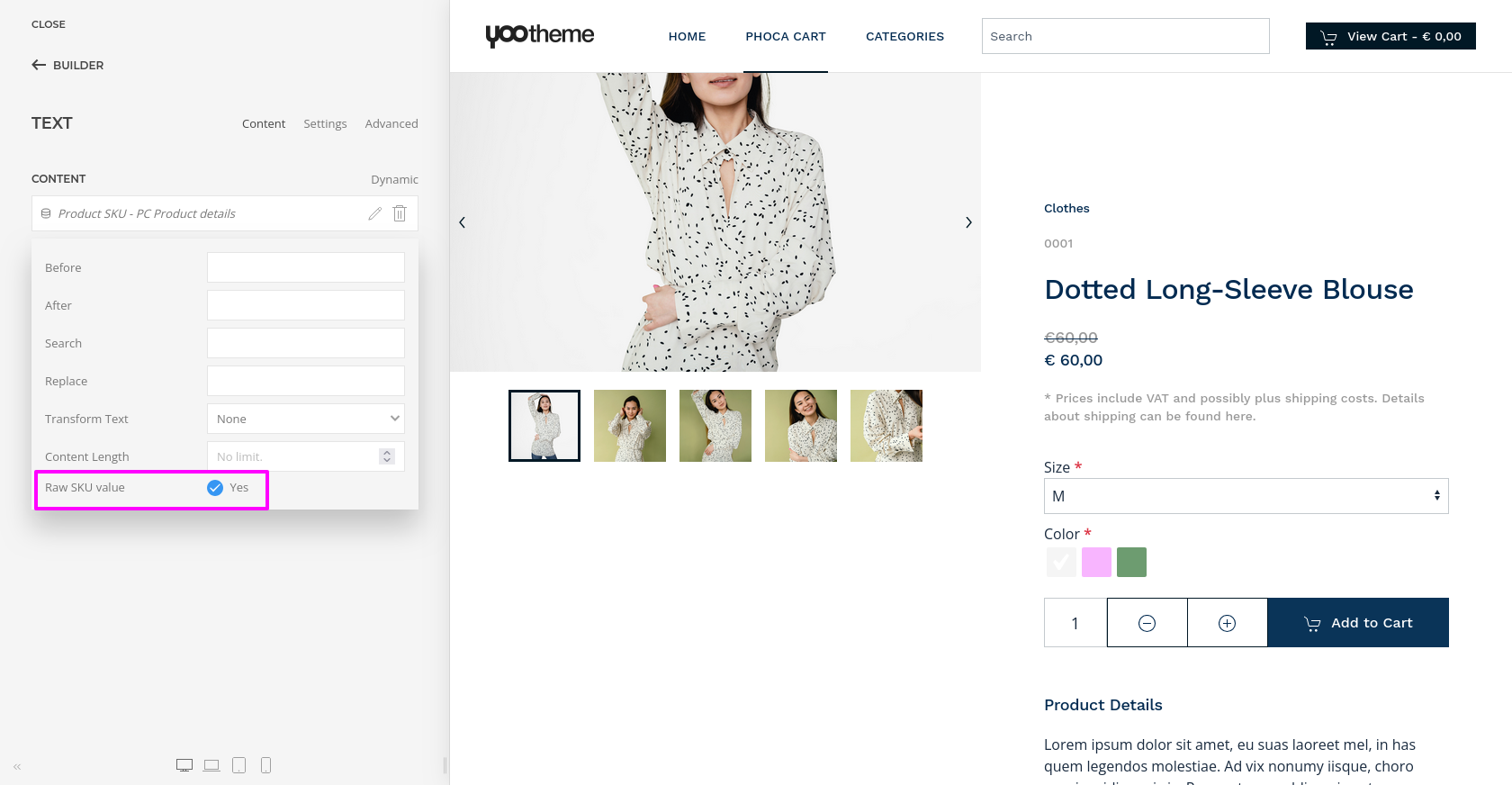
We have added a new param "Raw SKU Value" to the product SKU dynamic content source and updated the package file . So kindly check and confirm. Thank you
For urgent help please create a support ticket extensions.joomlapro.com/support/tickets
by JProStudio
Please Log in or Create an account to join the conversation.
Replied by toby07801 on topic Product SKU field returns formatted output instead of plain text
Posted 7 months 1 week ago #1083
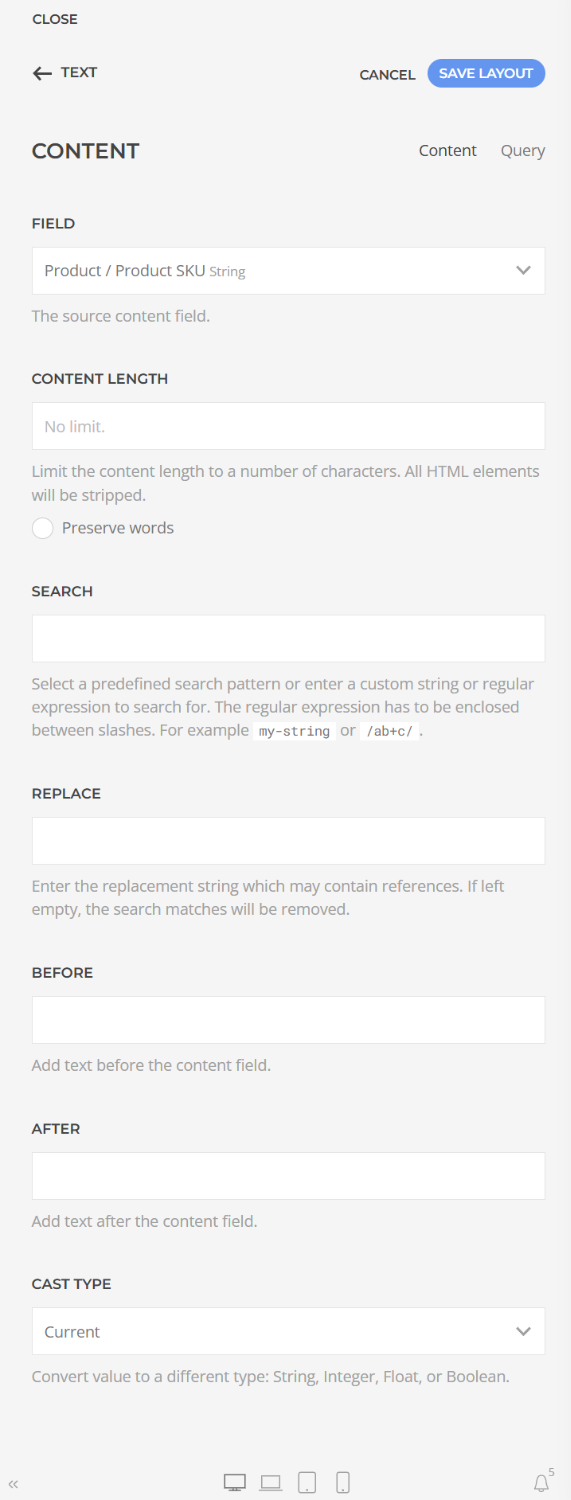
I'm afraid I can't see that. When I click the Edit icon on the SKU source in my Text element, I see this:
by toby07801
Please Log in or Create an account to join the conversation.
- JProStudio
-
Away
- Admin
-
- Posts: 536
- Thank you received: 80
Replied by JProStudio on topic Product SKU field returns formatted output instead of plain text
Posted 7 months 6 days ago #1089
You can find the options in Product SKU dynamic content source settings and make sure to install the latest package file. Thank you
For urgent help please create a support ticket extensions.joomlapro.com/support/tickets
by JProStudio
Please Log in or Create an account to join the conversation.
Replied by toby07801 on topic Product SKU field returns formatted output instead of plain text
Posted 7 months 6 days ago #1091
Got it, thank you. Yes it shows up now. 👍
by toby07801
Please Log in or Create an account to join the conversation.
Time to create page: 0.339 seconds
