
J2uikit
Article Index
J2uikit Core is a lightweight integration layer that connects J2Commerce with YOOtheme Pro and allows you to build custom store layouts using dynamic content.
Important: To ensure J2uikit Core overrides work correctly and avoid conflicts, please disable the "Product View - UIkit" plugin before using J2UIkit Core.
Instead of relying on rigid default templates, J2Uikit Core lets you work with J2Commerce products, categories, pricing, images, descriptions, and store data directly inside the YOOtheme Pro builder. It provides a clean and flexible workflow for creating custom product pages, category layouts, product listings, and store sections while keeping your Joomla website lightweight and performance-focused.
- Products as dynamic content source
- Categories as dynamic content source
- Product fields as dynamic content inside YOOtheme Pro
- Field mapping for prices, images, descriptions, product links, and related store content
- Template-ready structure for YOOtheme layouts
J2UIkit Core is ideal for users who want full design freedom in YOOtheme Pro while continuing to use J2Commerce as the underlying Joomla e-commerce engine.
How to install:
J2UIkit Core supports J2Commerce + YOOtheme Pro layouts and dynamic content workflows.
- Download the latest J2UIkit Core package from the product page.


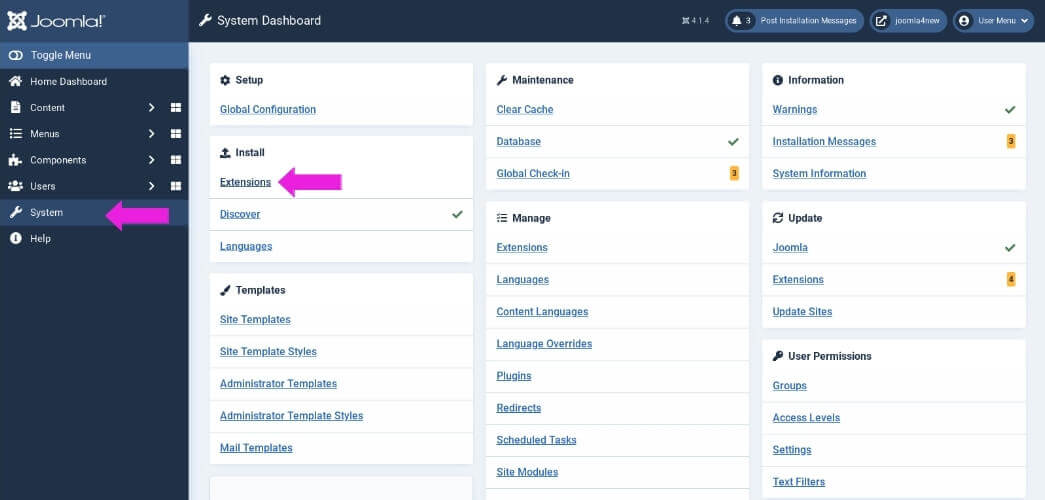
- You can install the plugin using the Joomla Extension Manager. Click “System -> Extensions” and then upload the zip file to install the extension.
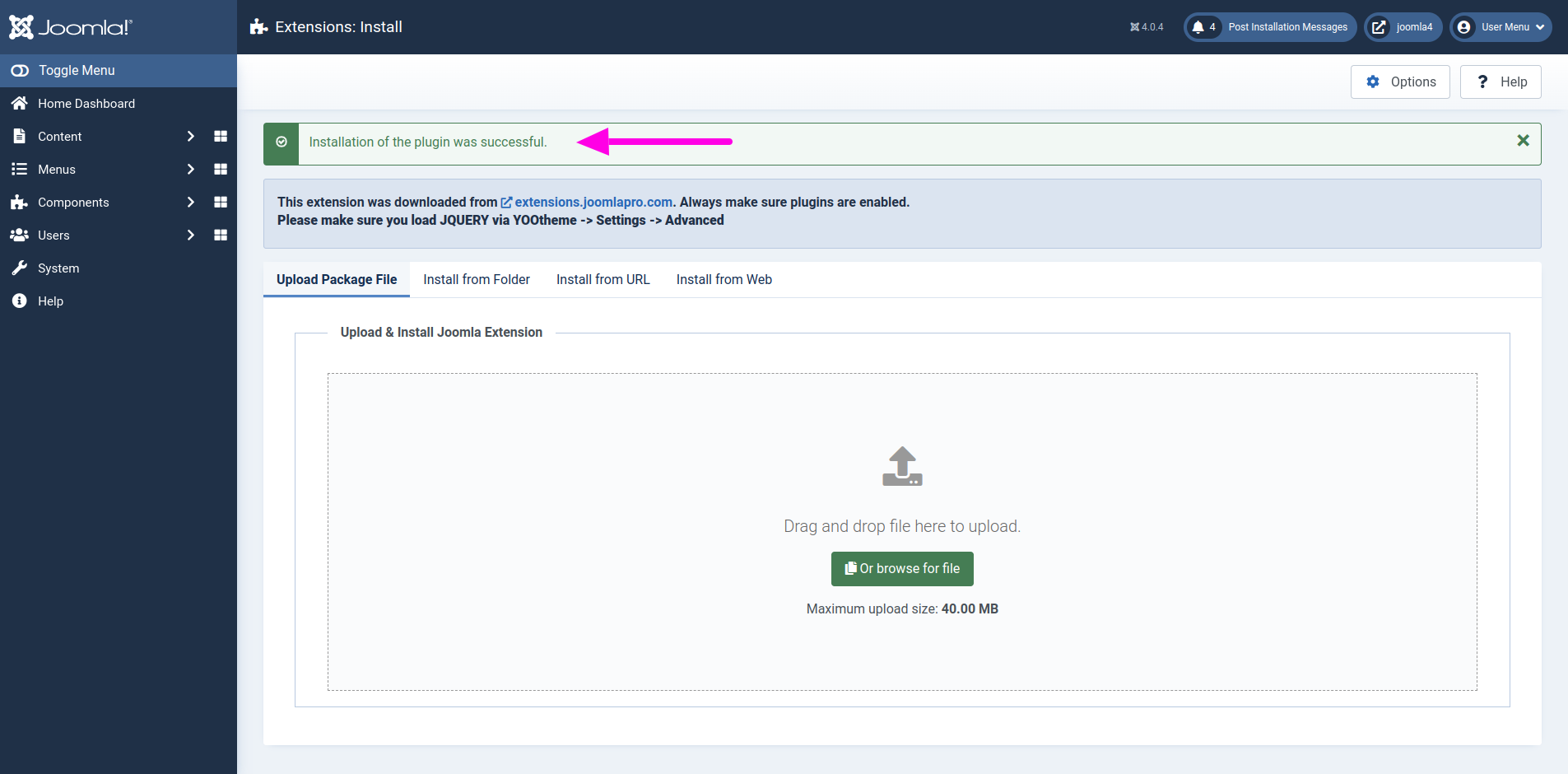
- From the main Joomla dashboard click “System -> Manage -> Extensions”. Use the Search or Filter feature to find the installed J2UIkit Core extension and then make sure the required plugin is enabled.

Getting Started:
- J2UIkit Core is designed to bring J2Commerce content directly into YOOtheme Pro using dynamic content sources.
- The Core version focuses on essential dynamic content integration and a lightweight architecture for flexible custom store building.
- You can use it to create custom layouts for product pages, category pages, product listings, and store landing pages directly inside the YOOtheme Pro builder.
- Please note that the Core version does not include custom YOOtheme elements, checkout redesign features, or extended frontend UI components. It is intended as a focused and minimal integration base for J2Commerce dynamic content inside YOOtheme Pro.
Custom Product:
- Open “YOOtheme” website builder inside the Joomla admin and edit the page where you want to display a custom product layout using dynamic content.
- Select the preferred builder elements from the YOOtheme Pro Website Builder elements list. For example, you may use Image, Heading, Text, Button, Grid, or HTML elements.

- Click “Advanced” in the selected element and choose the J2Commerce product dynamic content source.
- Once a product source is selected, its fields become available for mapping inside the element settings.

- To map a content field to an element field, open the Content tab of the element. Each field shows a Dynamic button on the right which opens a dropdown list of available fields.
- For example, you can map the image field to the product image, the heading field to the product title, the text field to the product description, and the HTML field to price or purchase-related output depending on your layout.

Custom Categories:
- Now open “YOOtheme” website builder inside the Joomla admin and edit the page where you want to display J2Commerce categories using dynamic content.
- Select the preferred builder element from the YOOtheme Pro Website Builder elements list. For example, you can use a Grid element to create a category overview.

- Click on the selected element and then click “ADD ITEM” to create a new item.

- Open the “Advanced” tab in the new item and select the J2Commerce Custom Categories dynamic content source.
- Once a category source is selected, its fields become available for mapping.

- Then open the Content tab and map the category title, image, description, or link fields to the corresponding element fields.

Product Listing:
- J2UIkit Core can be used to build custom product listings using YOOtheme Pro repeatable elements such as Grid, Gallery, List, or Slideshow depending on the design you want to create.
- Open the page in YOOtheme builder where you want to display J2Commerce products and choose the preferred builder element.

- Add a new item or edit the existing element, then open the “Advanced” tab and select the J2Commerce product source.

- After selecting the product source, you can map fields such as product title, image, intro text, description, price output, product link, or other available J2Commerce product data to the YOOtheme element fields.

Product Details Template:
- Open the product details page inside YOOtheme Pro builder and create or edit the product layout using standard YOOtheme elements.
- J2UIkit Core provides template-ready data that can be mapped into your layout for product title, images, descriptions, price output, product links, and related store content.

- Use the Dynamic Content options in the element fields to map the relevant product data. For example, you can map product title to a Heading element, description to a Text element, product image to an Image element, and price or purchase-related output to an HTML element.

- This gives you full control to build custom product details pages visually inside YOOtheme Pro instead of relying only on default J2Commerce template structures.

Category Template:
- Open the category page template in YOOtheme Pro and customize the layout using YOOtheme elements with J2Commerce category data.
- You can use grids, repeatable items, headings, images, buttons, and text elements to create category layouts that match your site design.

- Map the available category fields from the dynamic content dropdown to the selected YOOtheme element fields.
- For example, you can map the category title to a Heading element, the category image to an Image element, and the category description to a Text element.

Have a look of “J2UIkit Core” output.


